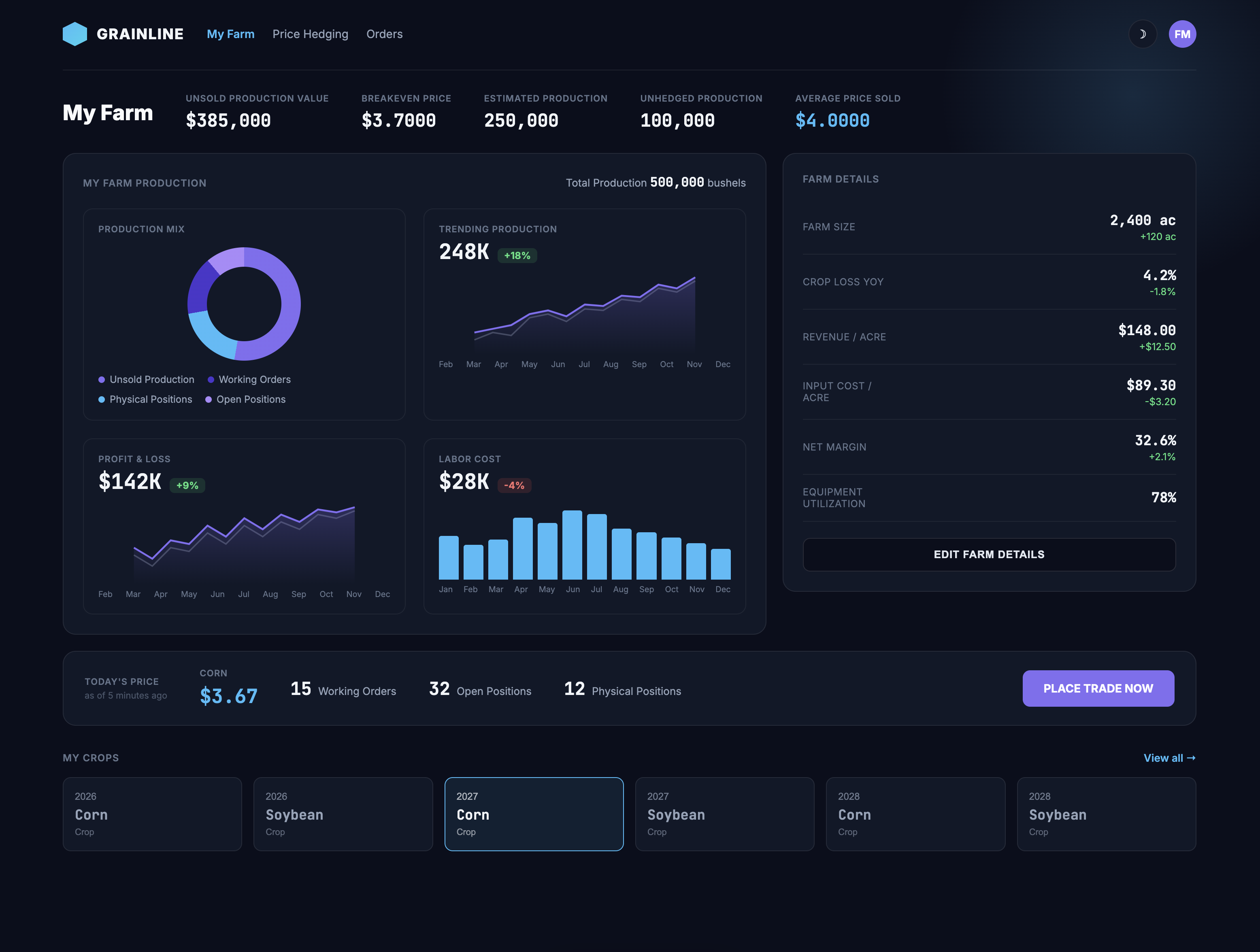
A farmer's financial cockpit
Grain producers hedge and sell production against volatile futures markets, but the tools built for that job came from trading floors, not farms. I designed a dashboard that speaks the producer's language — bushels, breakeven price, and today's cash bid — instead of a trader's.
Every screen ties directly back to one question: is this a good day to sell?
Unsold production value and breakeven price replaced the raw contract data producers found intimidating.
Today's price, open positions, and a single "Place Trade Now" action sit together so a decision never requires hunting across screens.
A dedicated crop-year selector keeps multi-year hedging positions distinct instead of blended into one confusing total.
Monospaced figures and consistent decimal precision on every price make the data feel exact, not approximate.
My focus was to ensure we captured our farmers' needs. This was a sticky-note session with farmers, Cargill, and product owners, and it surfaced several key pain points, most farmers were still tracking their operations with pencil and paper, then calling Cargill directly to place commodity trade requests, a process that took at least 60 minutes per call. Cargill wanted to reduce that overhead while giving farmers a single app to manage all their data in one place, and this session was the starting point for aligning on what that solution needed to look like.
Framing the farmer's jobs, not just the trades
A farmer isn't just placing trades, they're running a business. We mapped jobs across owning, operating, and working the farm alongside the commodity workflow itself, so every screen serves a real job, not just a transaction.
When land, equipment, and capital investments come due, I want to understand my true operating margins, so I can decide where to invest next season.
When commodity prices swing, I want visibility into my farm's overall risk exposure, so I can protect the long-term equity I've built.
When I'm planning planting and harvest, I want to see current market prices alongside my yield estimates, so I can time my sales for the best return.
When I'm managing day-to-day cash flow, I want a clear view of open positions and pending trades, so I can plan expenses with confidence.
When I'm out in the field, I want to check prices and place trades from my phone, so I don't have to stop and call someone.
When something urgent comes up, I want the app to alert me immediately, so I never miss the right price.
When I decide to hedge part of my crop, I want a simple, guided process to place a trade, so I can act quickly without needing a broker on the phone.
When I look back at closed positions, I want clear records of what I've sold and at what price, so I can reconcile it against what I've grown.
From checking the books to placing a trade
Every session starts in the same place, the dashboard, then splits into two jobs: keeping records current, and acting on the market. The flow below covers both paths end to end.
The result is a platform that turns commodity trading — usually cold, complex, and built for institutions — into something a family farm can read at a glance and act on with confidence.